
I wanted Pocket ID login before someone could create a Wastebin paste. But making everyone log in just to read a snippet rather defeats the reason I use a pastebin.
The final setup uses one Wastebin hostname. Opening the editor requires login. Existing paste links remain public, including rendered Markdown. I tested creation and viewing across separate browsers after applying the configuration to my permanent host.
This is the small follow-up to setting up Tinyauth with Pocket ID and Nginx Proxy Manager. Finish that guide first. Tinyauth login and full-host protection should already work.
TL;DR
- Protect the homepage editor (Wastebin) and every method except
GETandHEAD. - Allow
GETandHEADon other paths so recipients can open paste links. - Authenticate before entering the editor, avoiding a blocked login redirect during Save.
- Keep the tested rules on one permanent hostname so generated share links use the right address.
The editor needs login first
My first rule allowed every GET and HEAD, while sending other methods to Tinyauth. Public viewing worked, and anonymous write requests redirected to login.
Then I tried Save without signing in. Wastebin submitted its form to /new, NPM redirected it to the separate authentication hostname, and the browser blocked the redirect under Wastebin’s form-action 'self' Content Security Policy.
Signing in at the Tinyauth portal first made creation work. The remaining fix was to require login when opening /, before typing a paste. I kept Wastebin’s CSP unchanged.
The Wastebin 3.9.0 routes (opens in a new tab) include form creation at POST /new, API creation at POST /, and deletion routes. Protecting only /new would leave other write paths out.
Change the authentication check
Start on a temporary NPM hostname pointing at the same Wastebin backend. Copy the existing working forward-auth configuration there and confirm full-host login still works. Keep the permanent host unchanged during this test.
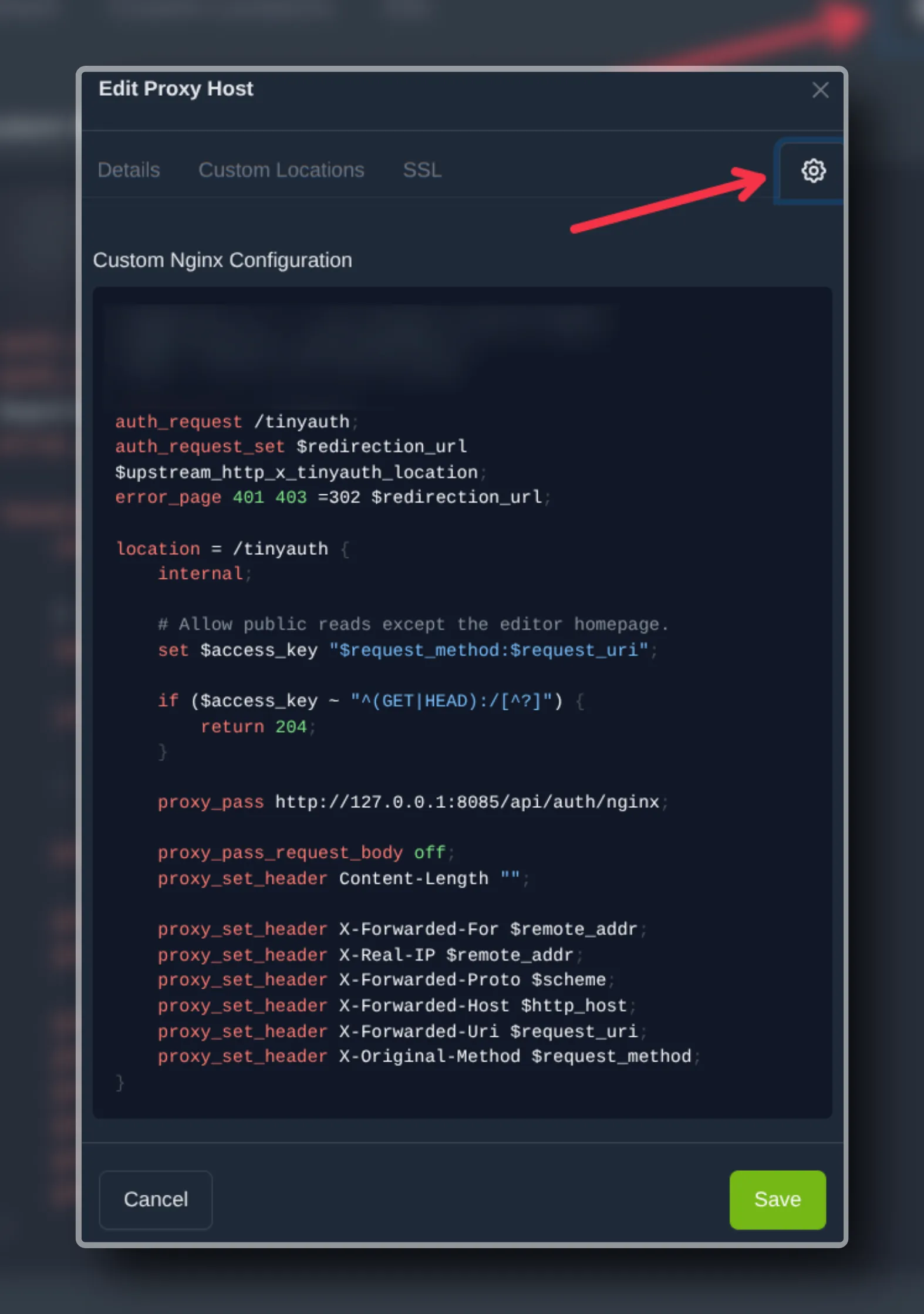
In the temporary host’s Advanced (the ⚙️ icon) tab, replace its existing location = /tinyauth block with the one below. Keep these three directives outside the block, once:
auth_request /tinyauth;auth_request_set $redirection_url $upstream_http_x_tinyauth_location;error_page 401 403 =302 $redirection_url;
location = /tinyauth {    internal;
    set $access_key "$request_method:$request_uri";    if ($access_key ~ "^(GET|HEAD):/[^?]") {        return 204;    }
    proxy_pass http://127.0.0.1:8085/api/auth/nginx;    proxy_pass_request_body off;    proxy_set_header Content-Length "";    proxy_set_header X-Original-URL $scheme://$http_host$request_uri;    proxy_set_header X-Original-Method $request_method;    proxy_set_header X-Forwarded-For $proxy_add_x_forwarded_for;    proxy_set_header X-Real-IP $remote_addr;}
This taking in the consideration that the native NPM and Tinyauth are on the same machine, as in the first guide. Keep your existing Wastebin upstream, SSL and unrelated Advanced settings.
The internal check returns 204 for public reads. That tells Nginx to continue to Wastebin. The visitor receives the paste page.
The rule checks the method and original URI together. It excludes / and /?query from the public exception. Other GET and HEAD paths are public, while other methods go to Tinyauth.
| Anonymous request | Expected behavior |
|---|---|
GET / or GET /?query | Redirect to login |
GET /PASTE_ID | Public paste, if it exists |
GET /md/PASTE_ID.md | Public rendered Markdown paste, if that is its generated URL |
GET /raw/PASTE_ID | Public raw paste, if it exists |
POST /new or POST / | Redirect to login |
| Other non-GET/HEAD methods | Authentication required |
Keep public backend access closed. NPM’s rules only apply to requests that pass through NPM.
Check the test host
After saving, run on the NPM machine:
nginx -tsystemctl is-active npmsystemctl is-active tinyauthAll checks should pass. Then run from your workstation, replacing the example hostname:
printf 'Editor: 'curl -sS -o /dev/null -w '%{http_code}\n' \  https://paste-test.example.com/
printf 'Editor with query: 'curl -sS -o /dev/null -w '%{http_code}\n' \  'https://paste-test.example.com/?check=1'
printf 'Anonymous form creation: 'curl -sS -o /dev/null -w '%{http_code}\n' \  -X POST https://paste-test.example.com/new
printf 'Anonymous API creation: 'curl -sS -o /dev/null -w '%{http_code}\n' \  -X POST https://paste-test.example.com/
Expect 302 for each. Inspect a response with -D - and confirm its Location points to your Tinyauth portal.
These commands does not send browser cookies and also do not follow redirect.
Now open the editor in a fresh browser session. Go through Pocket ID, create a disposable Markdown paste with a long enough expiry, and copy the exact generated link. Open it in another browser that isn’t logged in. The paste should render publicly. Its Home button should take that browser to login.
Check that exact paste URL from the terminal too:
curl -sS -o /dev/null -w 'Public paste: %{http_code}\n' \ 'https://paste-test.example.com/REPLACE_WITH_GENERATED_PASTE_PATH'Expect 200. Use the generated path, including any Markdown prefix or extension. An older test paste returned 404 after I had given it a ten-minute expiry. Checking a new paste removed that confusion.
Move the working rules to the permanent host
Once those checks pass:
- Save a copy of the permanent host’s existing Advanced (⚙️ icon) configuration.
- Merge the tested authentication configuration into that host, keeping unrelated settings and avoiding duplicate blocks.
- Run
nginx -tagain. - Repeat the editor redirect, anonymous POST checks, authenticated creation and public viewing on the permanent hostname.
My final results were an editor redirect, an anonymous creation redirect and 200 for a newly created public paste. Login, creation and public viewing also worked in separate browsers.
After your permanent host passes, remove the temporary NPM proxy host and its temporary DNS record, if you created one. Keep the authentication portal and the permanent Wastebin hostname. To roll back, restore the saved Advanced (⚙️) configuration and validate Nginx. This also restores the previous access policy.
A shared paste is still public to anyone with its link. Pocket ID controls entry to the editor and the tested write operations. It doesn’t make public snippets private or assign each paste to a Pocket ID user.
Comments