
I wanted Obsidian web on Proxmox, but I did not want to go through the entire dancing around it.
I already use Obsidian for everything. Notes, knowledge base, Quartz, Rabin.blog, random bits of brain dump. So when I started looking at Ignis, the goal was not some grand replacement story.
It was something simpler:
- can I use Obsidian from the browser and phone?
- will it support the plugins
- can I keep it private?
- can I avoid certificate warnings bothering me?
- can I keep this low-effort enough that I will actually use it?
Honestly, that is the real test in homelab land.
Most people failed to understand the need for a clean data format (TXT-based files are still OG) and the resilience of it. Whatever database you think you are cool with now, 30 years later, you will face the challenge to convert them.
Always take an agnostic approach; you will thank yourself - some 30 years later.
TLDR;
If you just want the short path, here it is:
- Deploy Ignis (opens in a new tab) in a Proxmox LXC.
- Install Tailscale inside the same LXC.
- Give the container
/dev/net/tun. - Turn on Tailscale HTTPS certificates.
- Use
tailscale serveto publish Ignis privately. - Open it from any device already on your tailnet.
That is basically it.
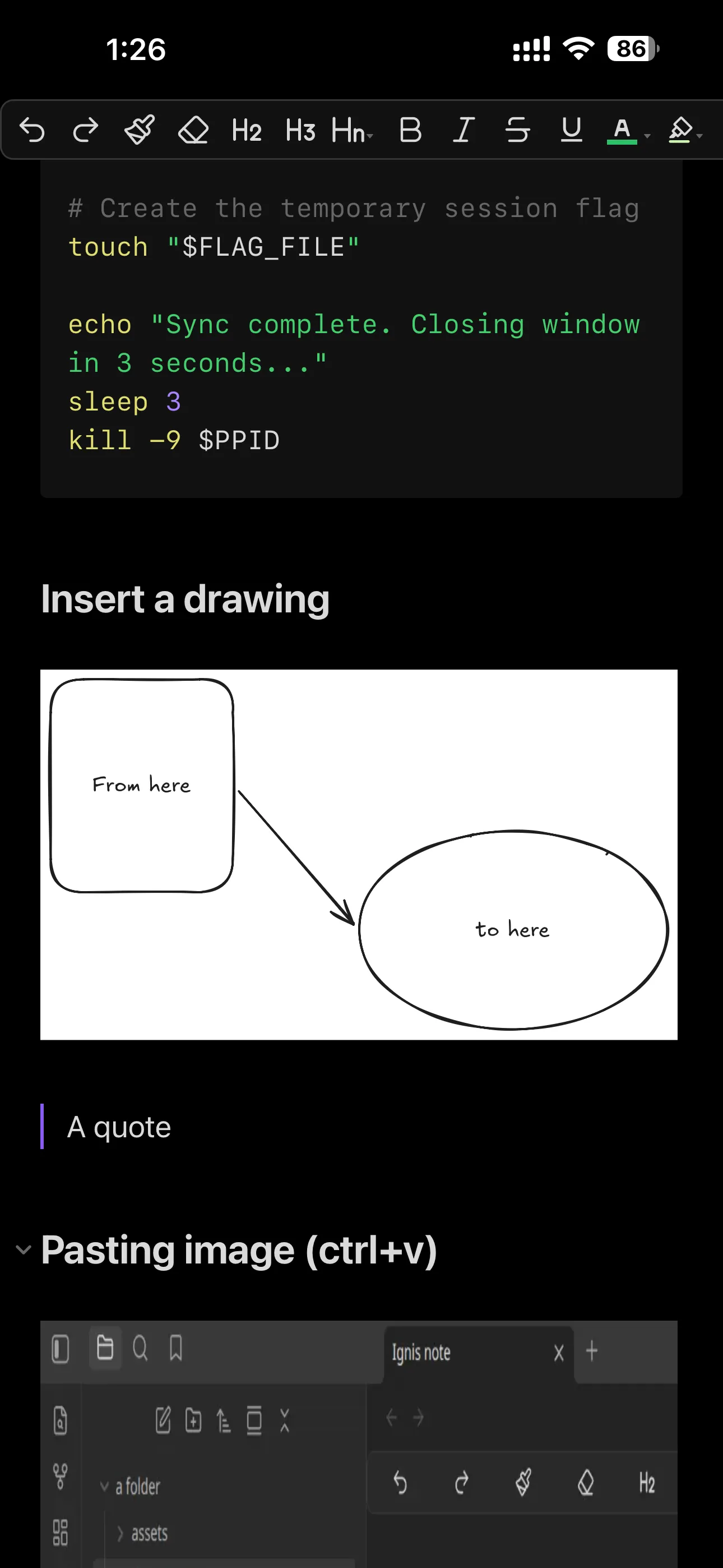
Ignis page on browser and phone
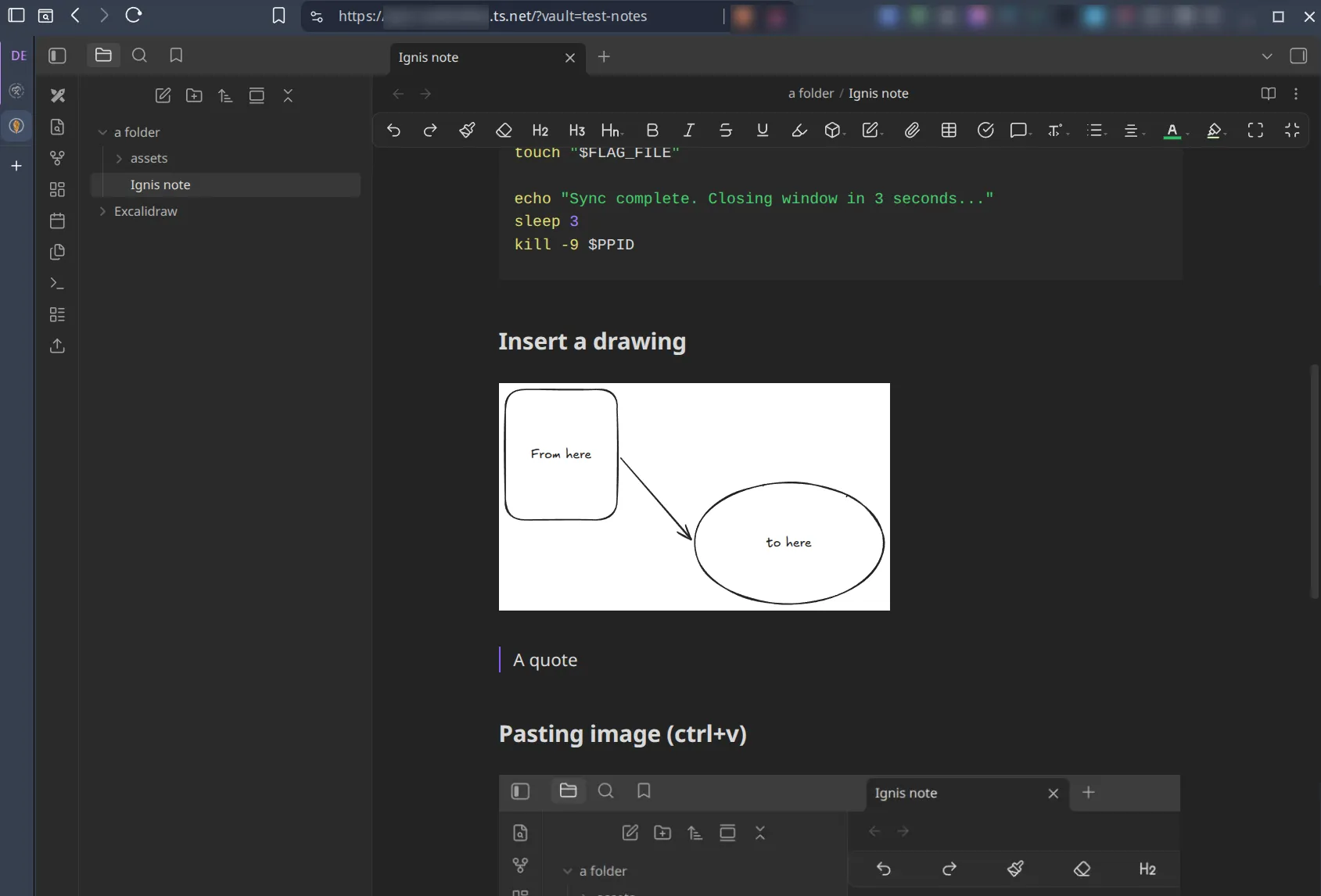
Above is on the browser; below is from the phone.
Why I went this way
I do have other ways to sync Obsidian.
I self-host an Obsidian Sync server with CouchDB too, so I can do live sync between devices. That works. It is solid once it is up.
But it is a little more work to set up in the beginning, and sometimes I just want the shortest path that still makes sense.
That is my usual reasoning.
If I can get the same practical result with less moving parts, I will usually take that route. Lazy? Eh, it depends on your definition. Efficient? yes.
Ignis fit that idea pretty well.
Why Ignis
Ignis (opens in a new tab) is basically a browser-based Obsidian setup that runs nicely in a Proxmox LXC.
Currently, the Ignis engine is built using the same Electron platform the Obsidian desktop application is compiled with, so it is the nearest to the desktop application in behavior and user-experiences.
This also means, there is far less of a learning curve, as the UX will be pretty much the same as the desktop application.
Important: Ignis does not do auth
This is the part that matters.
Ignis does not have proper built-in auth. So if you expose it to the internet, that is on you. 🫵
That means I would not put it on the public internet. I would not slap a random domain on it and pray for the best. I would not trust browser warnings as a standard security practice.
Nope.
The clean answer is: keep it inside Tailscale (or whatever similar rocks your boat).
That way only your own devices can touch it.
Important #2: vault storage lives under /opt/ignis_data
This matters more than people think.
My Ignis vaults live under the LXC instance:
/opt/ignis_dataSo if I want to work on the same vault from Obsidian Desktop and Ignis web, I need the data to land there somehow.
So how does each vault sit inside this? Here is an example:
/opt/ignis_data/vault-notes//opt/ignis_data/vault-kb/The easy way is to sync the vault into that path.
For me, the obvious options are:
- Syncthing
- something similar
- whatever other sync tool you already trust and use
I would just run Syncthing on both sides:
- one instance in the LXC
- one instance on the desktop machine
That keeps the vault moving between desktop and web without me manually copying files like it is in the early 2000s.
So, how do I put this together
1. Put Ignis in a Proxmox LXC
I kept it simple.
I used the community script here:
https://community-scripts.org/scripts/ignis (opens in a new tab)
That made the install quick & frictionless. Just GTD.
Make it an independent LXC; your backups will thank you.
Just a normal LXC with enough resources to be useful:
- 2 to 4 GB RAM
- 1 or 2 CPU cores
- enough disk for vaults and attachments, depending on what you have hoarded.
That is enough for this job.
Proxmox LXC resources for Ignis
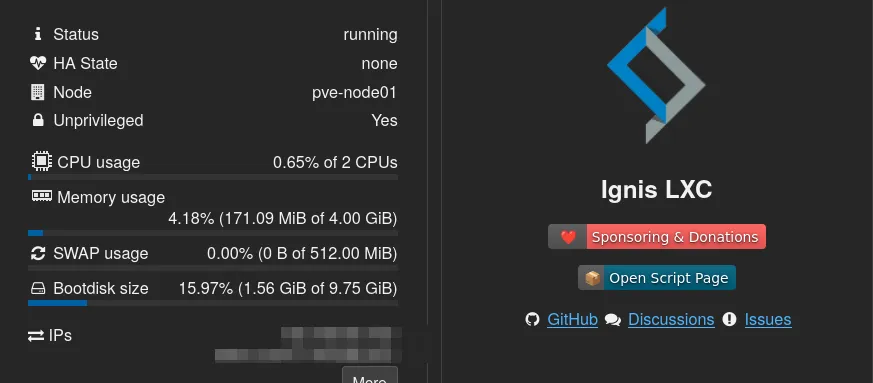
The LXC does not need much, but I tested on the safe side; I can always fine-tune the resources.
If you use Proxmox and do not use community scripts, that would be unwise, but I digress.
Generally, the command you need to run in a Proxmox shell is:
var_os='debian' bash -c "$(curl -fsSL https://raw.githubusercontent.com/community-scripts/ProxmoxVE/main/ct/ignis.sh)"Follow the prompts, and it will be done in no time.
And once it was up, I accessed it via the IP assigned to the LXC, accepted the warning from SSL. The script will also inform you which URL you need to open up.
I enabled community plugins. Installed some. A few plugins I care about worked fine too:
- Excalidraw
- Image Manager
- Image Converter
That was enough for me to stop looking at it as an “oh, it is a browser thing” and start to think of it as an actual usable Obsidian frontend that supports almost 98% of the desktop app.
2. Add /dev/net/tun
This is the bit people miss and then wonder why Tailscale is acting weird.
On Proxmox, I added the device passthrough in the GUI:
- open the LXC
- go to Resources
- click Add
- choose Device Passthrough
- add:
/dev/net/tun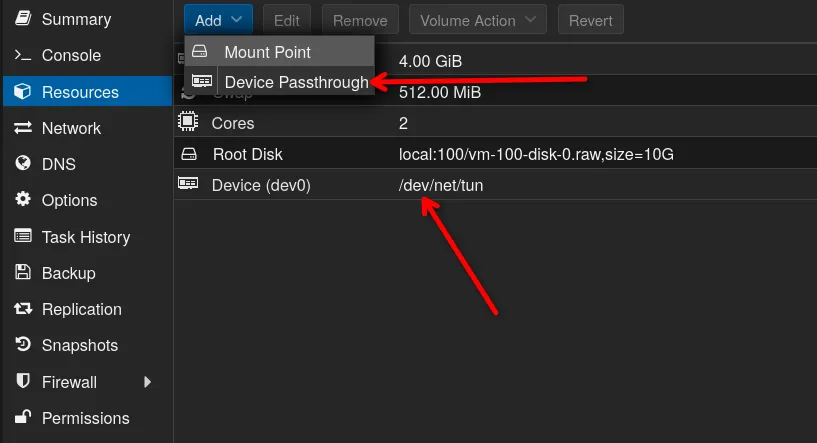
Then restart the container.
After restarting. Check inside the LXC:
ls -l /dev/net/tunIf the device is there, nice. Move to the next.
3. Install Tailscale inside the LXC
I installed Tailscale directly inside the container.
curl -fsSL https://tailscale.com/install.sh | shtailscale upThen I checked the usual stuff:
systemctl status tailscaledtailscale statustailscale ipNothing fancy. Just make sure it is actually online.
● tailscaled.service - Tailscale node agent Loaded: loaded (/usr/lib/systemd/system/tailscaled.service; enabled; preset: enabled) Active: active (running) since Wed 2026-08-19 09:44:58 +08; 2h 40min ago Invocation: 7f0371796f234a409767b0784fec6017 Docs: https://tailscale.com/docs/ Main PID: 475 (tailscaled) Status: "Connected; [REDACTED]" Tasks: 10 (limit: 70574) Memory: 26.5M (peak: 44.1M) CPU: 2min 38.361s CGroup: /system.slice/tailscaled.service └─475 /usr/sbin/tailscaled --state=/var/lib/tailscale/tailscaled.state --socket=/run/tailscale/tailscaled.sock --port=41641tailscaled connected in the LXC. Next.
4. Check the Ignis port
Before I touched Tailscale Serve, I checked what Ignis was listening on:
ss -lntptailscale serve statusIf it is on HTTPS port 443, that is easy mode. Most of the time, it will be 443 if you use the script.
If yours is on some other port, use that one instead. Do not guess. Just run the command and see the port. Similar to the line below:
LISTEN 0 511 0.0.0.0:443 0.0.0.0:* users:(("nginx",pid=135,fd=6),("nginx",pid=134,fd=6),("nginx",pid=133,fd=6))5. Let Tailscale Serve handle the HTTPS side
This is the whole magic here.
Ignis presents its own certificate, and that usually means browser warnings. I did not want to babysit that on every device.
So I let Tailscale Serve sit in front of it and handle the public-facing HTTPS endpoint:
tailscale serve --bg https+insecure://127.0.0.1:443Then I checked it:
tailscale serve statusWhat I wanted to see was something like this:
https://ignis.tail0.ts.net|-- / proxy https+insecure://127.0.0.1:443That https+insecure:// bit is what makes it work cleanly.
- Tailscale serves the trusted HTTPS cert outside.
- Ignis keeps its self-signed cert inside.
- Browsers stop complaining.
- Ah, life gets peaceful.
One thing I had to enable first
If Tailscale Serve complains about HTTPS certs, you need to enable them in the Tailscale admin console:
DNS -> HTTPS Certificates
That is required.
There is usually a one-time acknowledgment in there because Tailscale is issuing certs for the *.ts.net hostname. Normal stuff.
What the flow looks like
flowchart TB    A["📱 Phone or Browser"]    B["🔐 Tailscale"]    C["🔒 valid *.ts.net HTTPS"]    D["↪️ tailscale serve"]    E["🔥 Ignis in the LXC"]
    A -->|Private access| B    B -->|Encrypted route| C    C --> D    D --> E
    class A client;    class B,C secure;    class D proxy;    class E app;
And why this setup matters:
flowchart TB    A["Ignis"]    B["🌐 Public Internet"]    C["🔐 Your Tailscale devices"]
    B -. "No public exposure" .-> A    C -->|"Authenticated private access"| A
    class A app;    class B blocked;    class C private;
That is really the whole architecture.
- Nothing is public.
- Nothing is exposed.
- Able to access from all my Tailscale devices, including phone, tablet, etc.
Why I prefer this setup
Because it is lazy in a good way.
It gives me what I need without adding a pile of plumbing; if I do the plumbing, I will forget it in 3 months time.
It also means:
- my phone can open Obsidian web, yes; add a bookmark to the home screen
- my desktop can still use Obsidian normally
- vault data can sync into
/opt/ignis_data - I can keep the service private
- I do not need to expose Ignis to the internet
- I do not have to trust a browser warning and call it security
That last two are important.
Syncing the vault
If I want the same vault available in both places, I sync it.
That means:
- Obsidian Desktop on my machine
- Ignis in the LXC
- Syncthing in both places
I am not married to Syncthing specifically, but I do have 14 instances of it. It is just the shortest, most visual, and most practical route for me most of the time.
The important part is that the vault data has to land in /opt/ignis_data, because that is where Ignis expects it.
So if you are planning this setup, do not forget the data path. That is the bit people always skip until they cry later.
Backup matters
I back up everything, especially data folders.
This is not the kind of thing I like leaving to chance.
My homelab backup habit is already built around 3-2-1 encrypted backups, with things like the following:
- NAS
- SFTP
- Restic
- S3
- Borg
So yes, the Ignis data folder and anything important around it should be part of the backup story too.
Version the Proxmox host configuration separately: it complements a vault-data backup but does not replace it.
- If the vault matters, back it up.
- If the sync path matters, back it up.
- If
/opt/ignis_datamatters, back it up.
Otherwise, you are just self-sabotaging the hard way.
What worked for me
After the setup, I tested the usual stuff:
- Obsidian opened in the browser
- phone access worked
- the browser warning was gone
- Excalidraw worked
- Image Manager worked
So yes, the browser path was actually usable. Not just technically possible. Usable.
That was enough for me (no, it wasn’t; come back and read my mind (opens in a new tab) in a few months 🫠).
My simple recommendation
If you want Obsidian Web on Proxmox and you want it private, do this:
- Ignis in an LXC
- Tailscale in the same LXC
/dev/net/tunpassthroughtailscale serve- keep it tailnet-only
- sync the vault into
/opt/ignis_data - back it up like it matters, because it does
That is the shortest version I can give you. If you do not need it on your phone outside the house, then you can skip Tailscale (I would not recommend you do that), but you have to figure out how to get rid of the SSL warnings. I hate it so much that I actually implemented Pocket ID.
Anything more complex is probably just you diversifying the problem in the long-term.
Did you make it simpler than this? Love to know; drop a comment below.
References
- Ignis community script: https://community-scripts.org/scripts/ignis (opens in a new tab)
- Ignis GitHub repo: https://github.com/Nystik-gh/ignis (opens in a new tab)
- Tailscale LXC docs: https://tailscale.com/docs/features/containers/lxc/lxc-unprivileged/ (opens in a new tab)
- Tailscale Serve docs: https://tailscale.com/docs/features/tailscale-serve/ (opens in a new tab)
- Tailscale HTTPS certificates: https://tailscale.com/docs/how-to/set-up-https-certificates/ (opens in a new tab)
Comments