
Managing one Docker host is easy.
Managing four of them is where the small and crazy annoyances start multiplying.
One host has a Compose file under /opt. Another has everything under /home/.../docker. A storage box (NAS) has its own container manager. One machine stays on all the time. Another sleeps every night. Updates are easy until you forget which host owns which stack, which Compose file created it, and whether clicking an “update” button actually recreated the Compose project or only replaced a container underneath it.
That was the problem I wanted to solve.
I did not need Kubernetes. I did not need another full-time infrastructure hobby. I just wanted one place where I could:
- see every Docker host;
- see containers and Compose stacks across the fleet;
- know which images have updates;
- update selected stacks manually;
- keep critical services out of automatic updates;
- preserve the real Compose files as the source of truth;
- gradually move those Compose files into Git;
- expose an API so I can build my own dashboard on top.
I ended up using Komodo (opens in a new tab).
The interesting part was not installing it. The interesting part was getting from several already-running Docker hosts to a centrally managed setup without rebuilding everything from scratch.
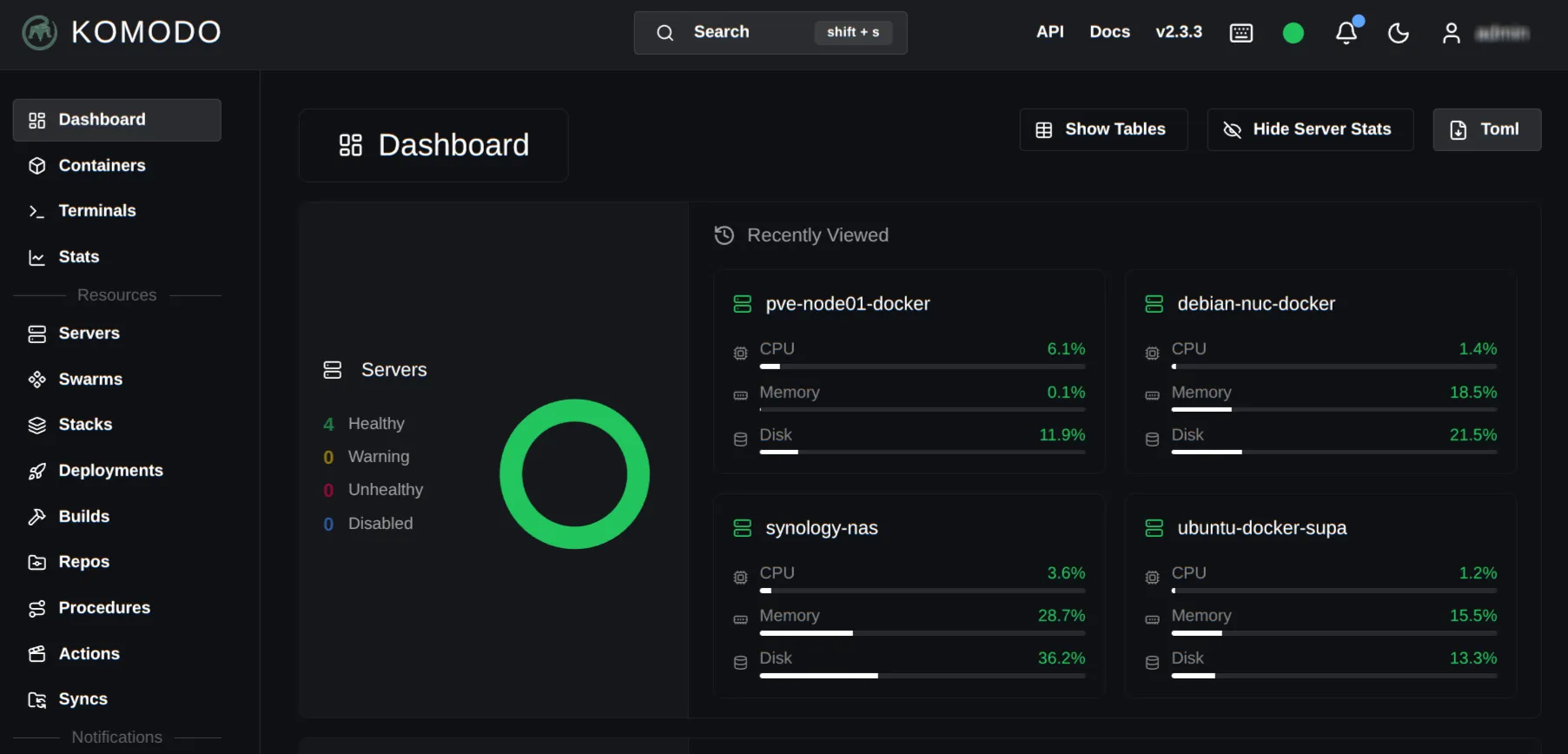
The homelab I was trying to clean up
The Docker hosts are intentionally different.
- Control host: a Docker VM running on an always-on business micro PC with a 6-core Intel Core i5-9500 and 32 GB RAM on the physical host.
- Utility host: a small NUC-class Debian machine with 8 GB RAM. It runs lightweight, always-on services.
- Workload host: a Docker VM on a workstation-class tower with 64 GB RAM. This physical host sleeps every night, so nothing critical should depend on it.
- Storage host: a 4-bay NAS appliance that also runs a handful of containers.
The actual names are not important. The important bit is that these machines have different jobs and different uptime expectations.
That is exactly where “just SSH into the box and run docker compose pull” stops being useful.
The first problem: updates were not the same as deployments
I originally used Watchtower-style automatic updates.
That model is simple:
new image→ pull image→ recreate container→ continueIt works surprisingly well until Compose becomes the real source of truth.
I later tested WUD (What’s Up Docker) because it gives much better fleet-wide visibility and a useful API. WUD could see multiple Docker engines and correctly detect new image digests.
The problem showed up when I manually triggered an update on a remote Compose-managed service.
WUD reported the update as completed, but the service was still effectively owned by the original Compose project. I eventually had to go to that host and run Compose myself:
docker compose pull uptime-kumadocker compose up -d uptime-kumaThat was the point where the architecture became obvious.
I did not really want a container updater.
I wanted a Compose-aware control plane.
There is a difference.
flowchart TD A["📦 Image update"] --> B{"Who owns deployment?"} B -->|"Container updater"| C["🐳 Recreate container"] B -->|"Compose control plane"| D["🧩 Reconcile Compose stack"] D --> E["✅ Compose remains source of truth"]WUD is still useful for monitoring and update discovery. It simply was not the deployment model I wanted for these hosts.
Why Komodo fit this problem?
Komodo separates the system into two main pieces:
- Core is the central UI, API, database and control plane.
- Periphery runs on each Docker host and performs the local Docker/Compose work.
That matters because the central server does not need raw Docker TCP access to every machine.
Periphery can connect outbound to Core.
flowchart TD    K["🦎 Komodo Core"]    A["🖥️ Control Docker host<br/>Periphery"]    B["📦 Utility Docker host<br/>Periphery"]    C["⚙️ Workload Docker host<br/>Periphery"]    D["💾 Storage Docker host<br/>Periphery"]
    A --> K    B --> K    C --> K    D --> K
Komodo v2 uses the :2 image tags, supports outbound Periphery connections, PKI-based Core/Periphery authentication, onboarding keys, image update polling, Git-backed stacks and an OpenAPI-documented API.
That was much closer to what I was looking for.
Installing Komodo Core
I placed Core on the mostly-empty Docker VM on the always-on control machine.
I also kept a local Periphery instance there because Core itself does not manage the local Docker engine. Periphery does.
My simplified layout looks like this:
services:  mongo:    image: mongo:latest    container_name: komodo-mongo    restart: unless-stopped    environment:      MONGO_INITDB_ROOT_USERNAME: ${KOMODO_DATABASE_USERNAME}      MONGO_INITDB_ROOT_PASSWORD: ${KOMODO_DATABASE_PASSWORD}    volumes:      - mongo-data:/data/db      - mongo-config:/data/configdb
  core:    image: ghcr.io/moghtech/komodo-core:2    container_name: komodo-core    init: true    restart: unless-stopped    depends_on:      - mongo    env_file:      - ./compose.env    environment:      KOMODO_DATABASE_ADDRESS: mongo:27017    ports:      - "9120:9120"    volumes:      - komodo-keys:/config/keys      - /opt/komodo/backups:/backups
  periphery:    image: ghcr.io/moghtech/komodo-periphery:2    container_name: komodo-periphery    init: true    restart: unless-stopped    depends_on:      - core    env_file:      - ./compose.env    volumes:      - komodo-keys:/config/keys      - /var/run/docker.sock:/var/run/docker.sock      - /proc:/proc      - /etc/komodo:/etc/komodo      - /opt:/opt
volumes:  mongo-data:  mongo-config:  komodo-keys:
The relevant compose.env values are:
KOMODO_HOST=https://komodo.example.internalKOMODO_LOCAL_AUTH=trueKOMODO_INIT_ADMIN_USERNAME=adminKOMODO_INIT_ADMIN_PASSWORD=CHANGE_MEKOMODO_FIRST_SERVER_NAME=control-docker
PERIPHERY_CORE_ADDRESS=ws://core:9120PERIPHERY_CONNECT_AS=control-dockerPERIPHERY_CORE_PUBLIC_KEYS=file:/config/keys/core.pubPERIPHERY_ROOT_DIRECTORY=/etc/komodoPERIPHERY_STACK_DIR=/opt
I put Komodo behind my existing internal reverse proxy with HTTPS.
That solved two things immediately:
- normal browser access through a trusted internal hostname;
- a clean HTTPS endpoint for API clients.
Adding remote Docker hosts with Periphery
The remote hosts use the same basic periphery container.
The important part is outbound mode:
services:  periphery:    image: ghcr.io/moghtech/komodo-periphery:2    container_name: komodo-periphery    init: true    restart: unless-stopped
    environment:      - TZ=Asia/Kuala_Lumpur      - PERIPHERY_CORE_ADDRESS=wss://komodo.example.internal      - PERIPHERY_CONNECT_AS=utility-docker
      # First registration only      - PERIPHERY_ONBOARDING_KEY=PASTE_ONBOARDING_KEY_HERE
      - PERIPHERY_CORE_PUBLIC_KEYS=file:/config/keys/core.pub      - PERIPHERY_ROOT_DIRECTORY=/srv/docker      - PERIPHERY_DISABLE_TERMINALS=false      - PERIPHERY_DISABLE_CONTAINER_EXEC=false
    volumes:      - /var/run/docker.sock:/var/run/docker.sock      - /proc:/proc      - /srv/docker:/srv/docker      - /srv/docker/komodo-periphery:/etc/komodo      - /srv/docker/komodo-periphery/keys:/config/keys
The process is:
- create an onboarding key in Komodo;
- start Periphery with that key;
- wait for the new Server to appear in Komodo;
- remove
PERIPHERY_ONBOARDING_KEY; - recreate Periphery.
The onboarding key is bootstrap material. Once the Server exists, Core and Periphery continue using their long-term keys.
One thing that caught me: an internal-only hostname must actually resolve inside the Periphery container. If your internal DNS is different from Docker’s default resolver, set dns: explicitly or fix Docker DNS properly.
Adopting existing Compose projects first
I did not move everything into Git immediately. Even as of now, only a few of them have moved. The idea is to put new ones in Git.
That would have been too many changes at once.
Komodo supports Files on host, which is perfect for migration.
For each existing stack I first checked the real Compose project name:
docker compose lsAnd when I wanted to be absolutely sure:
docker inspect CONTAINER_NAME \ --format '{{ index .Config.Labels "com.docker.compose.project" }}'If the existing project is called:
media-projectbut I create a Komodo Stack called:
mediaI set Komodo’s Project Name to media-project.
Then I configure:
Server: utility-dockerFiles on host: ONRun directory: /srv/docker/mediaFile path: compose.yamlProject name: media-projectAt this stage I do not deploy anything.
First I needed to verify that Komodo can read the existing Compose file and recognizes the running services.
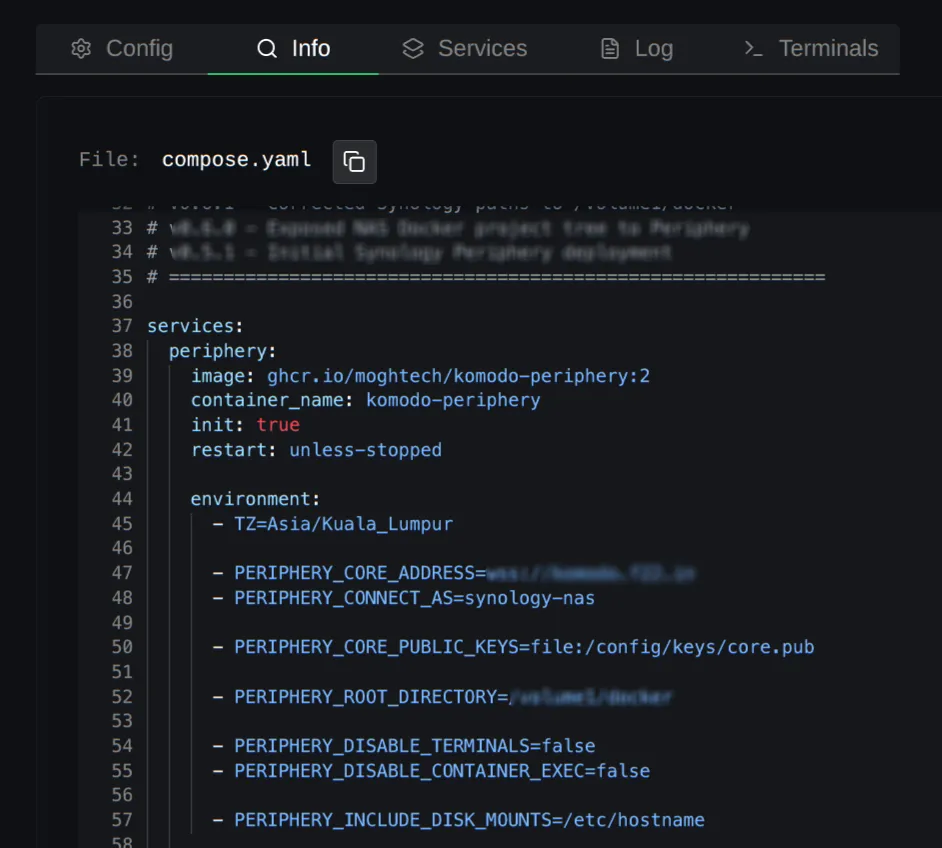
This migration method was useful because it separated two questions:
Can Komodo understand and control the stack that already exists?
from:
Should this stack move into Git?
Those are not the same migration path.
The Git-backed workflow I actually want
Once the existing stacks were visible and working, I started moving their deployment definitions into a private GitHub repository.
My structure is something like:
├── general│ └── socket-proxy│ └── compose.yaml├── nas│ ├── qbit│ │ └── compose.yaml│ └── suggestarr│ └── compose.yaml├── node01├── node02├── nuc│ └── radicale│ ├── compose.yaml│ └── config└── README.mdThe persistent application data stays on each Docker host.
Only the deployment definition moves to Git.
For stateful services, back up the application data separately; Git-backed Compose definitions do not contain the data needed to restore the service.
That separation is important:
GitHub└── compose.yaml
Docker host└── /srv/appdata/application
I do not want databases, application state or random bind-mounted data in the deployment repository.
GitHub authentication with a PAT
Komodo can configure Git providers under:
Settings → ProvidersFor GitHub I added:
- domain:
github.com - username: my GitHub username
- token: a repository-scoped PAT
Komodo clones private repositories over HTTPS using the configured account.
I prefer a narrowly scoped token that can read the one private infrastructure repository rather than a broad token that can access everything.
I also created a reusable Repo resource in Komodo for the homelab repository. That means individual Stacks do not need the Git provider, account, repository and branch entered from scratch every time.
The Stack only needs the relevant subdirectory and deployment settings.
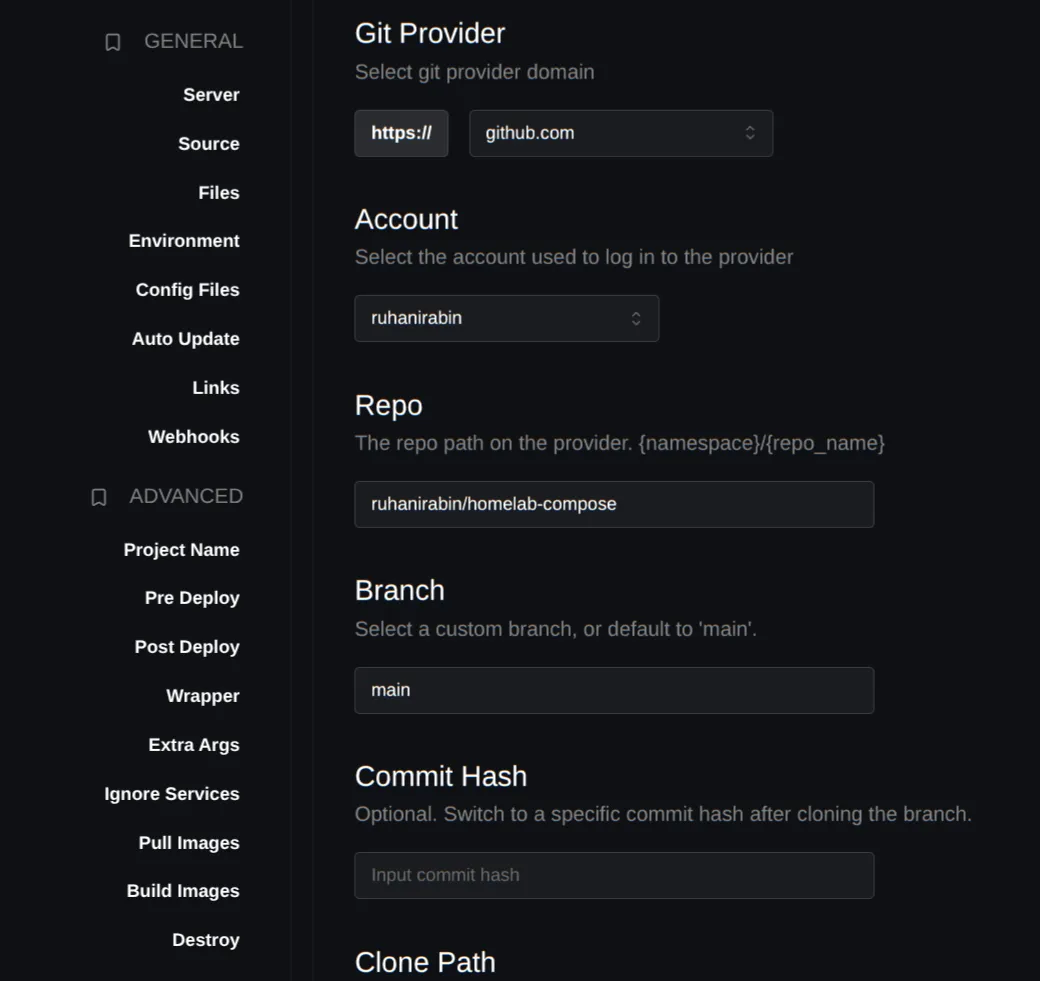
Moving one running service from local Compose to Git
The first real Git migration was deliberately small.
The old Compose project was already running and had persistent data mounted from the host.
The safe sequence was:
- commit the Compose definition into Git;
- keep the existing persistent data directory untouched;
- confirm the existing Compose project name;
- stop the old project with
docker compose down; - create the Git-backed Komodo Stack using the same project name;
- deploy from Komodo;
- verify the old data is still there.
The new Compose file included an explicit project name:
name: suggestarr-compose
services:  suggestarr:    image: ciuse99/suggestarr:latest    container_name: SuggestArr    restart: always
    ports:      - "5111:5111"
    volumes:      - /srv/appdata/suggestarr:/app/config/config_files
    environment:      LOG_LEVEL: info      SUGGESTARR_PORT: "5111"      PUID: "1029"      PGID: "65536"      TZ: Asia/Kuala_Lumpur      UMASK: "022"
Komodo cloned the repository onto the remote host, deployed the stack, and the existing application data came straight back because the bind mount never moved.
That is the migration pattern I will use going forward.
Selective updates instead of “update everything”
I do not want global unattended updates.
Komodo lets me separate polling from automatic deployment.
For most important stacks I use:
Poll for updates: ONAuto update: OFFThat gives me the useful part:
new image exists→ Komodo shows update→ I decide when to deployFor low-risk stateless services I can enable automatic updates later.
For Komodo itself, I only poll. A control plane automatically updating itself while I am asleep is clever right up until it isn’t.
The first real update test was a backup application running on the utility host.
Komodo showed a pending image update. I clicked update. The Compose stack was recreated on the correct remote machine, and docker compose ps immediately showed the new container creation time.
That was the test I really cared about.
Not “the dashboard says success.”
The actual Compose project had been reconciled.
Fleet-wide visibility
Once Periphery was running everywhere, the mental model became much simpler.
flowchart TD    G["🐙 GitHub<br/>Compose definitions"]    K["🦎 Komodo Core<br/>UI + API"]    A["🖥️ Control host"]    B["📦 Utility host"]    C["⚙️ Workload host"]    D["💾 Storage host"]
    G --> K    K --> A    K --> B    K --> C    K --> D
I can now answer the basic homelab questions from one place:
- What is running?
- Which machine owns it?
- Which Compose stack owns the container?
- Is an image update available?
- Which services should update automatically?
- What changed during the last deployment?
- Is one Docker host offline because it is sleeping, or because something actually broke?
That last one matters for my workload machine, which intentionally powers down every night. Komodo showing that Server offline is expected behavior, not an incident.
The API was a bigger reason than I expected
I already maintain a small dashboard called Dynacat.
I do not necessarily want to keep Komodo open all day. I want a compact view that tells me whether the Docker fleet needs attention.
Komodo exposes API-key authentication using:
X-Api-KeyX-Api-SecretA simple authentication check looks like:
curl -s https://komodo.example.internal/user \ -H "X-Api-Key: $KOMODO_API_KEY" \ -H "X-Api-Secret: $KOMODO_API_SECRET"The API is much broader than that. Komodo v2 includes OpenAPI documentation and separates read, write and execute operations.
That means I can keep Komodo as the actual control plane while Dynacat becomes the small screen I look at every day.
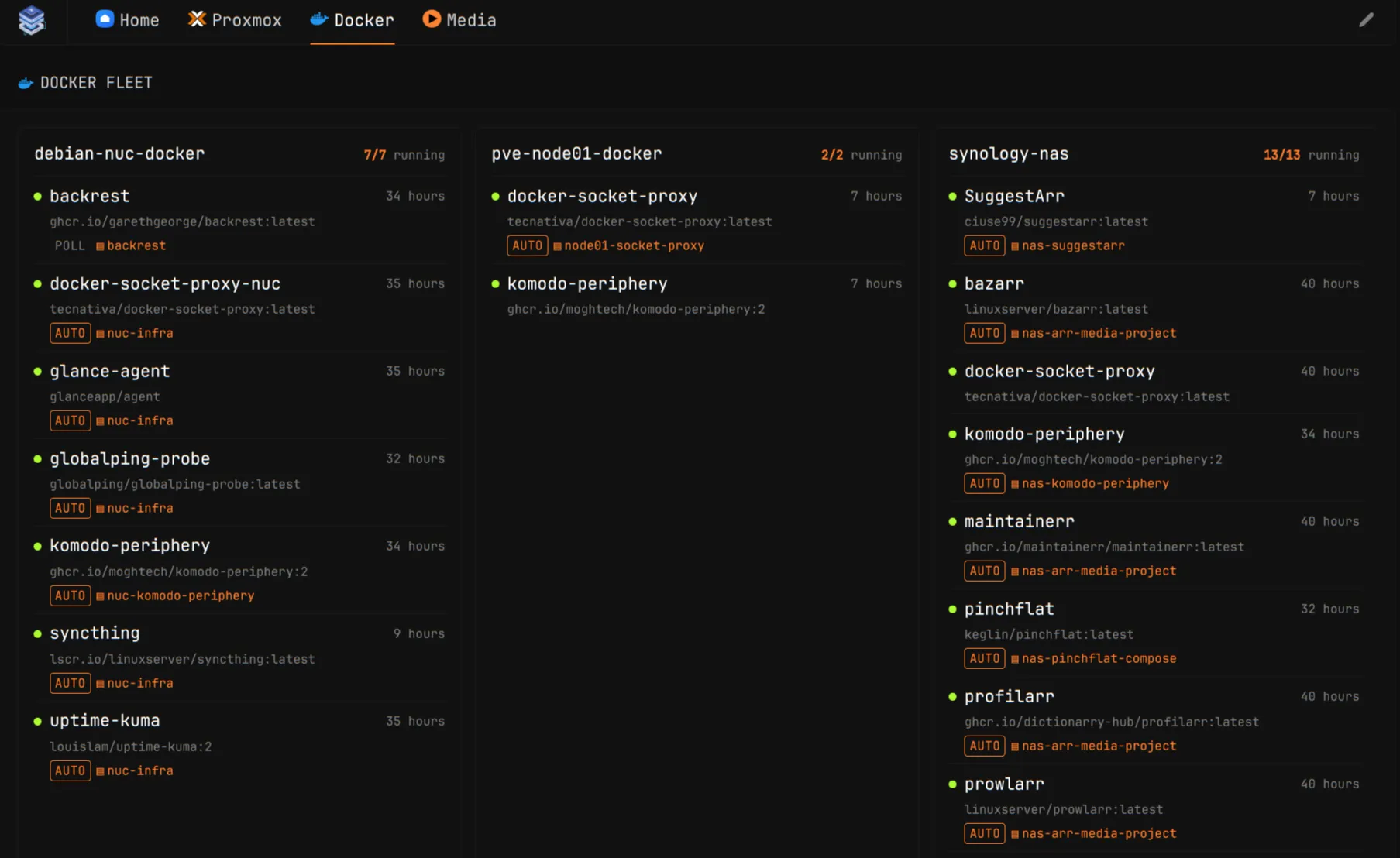
Komodo does not need to become my entire dashboard.
It just needs to expose a reliable control plane that other tools can talk to.
What I would do differently
I took the long route. Clearly, wasted a bit of time with WUD.
I started by trying to improve the updater.
That was the wrong layer.
The better question was:
What owns the deployment?
Once the answer was “Docker Compose”, the rest became simpler.
If I were doing this again, I would:
- install Komodo Core first;
- add Periphery to each Docker host using outbound mode;
- adopt every existing Compose project with Files on host;
- verify project names and deployment behavior;
- turn on update polling, but not automatic updates;
- create one private Git repository;
- configure GitHub once with a scoped PAT;
- move Compose definitions into Git one stack at a time;
- keep persistent application data on the Docker hosts;
- only then consider Resource Syncs for full declarative Komodo configuration.
The important part is one change at a time.
That is how homelabs become weekend support problems.
Where I am going next
The immediate goal is simple: every Compose definition should eventually live in the Git repository.
The machines should mostly contain:
DockerPeripherypersistent application dataThe repository should contain:
Compose definitionsdocumentationnon-secret configurationKomodo sits between them and handles deployment.
Later I may move the Komodo resources themselves into Resource Syncs, which would make more of the control-plane configuration declarative as well.
For now, Git-backed Stacks will serve me a long while.
They solve the actual problem without creating a bigger one.
But, you know how it is; it is always an evolving experiment. So, we will only see where we go from here.
Comments